25 Apr 2022
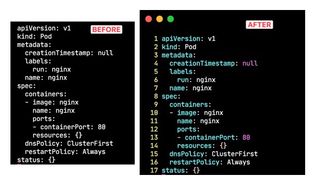
How to enable indentation, line numbers and syntax highlighting in Vim
- vim
- linux
- howto
A quick way to enable syntax highlighting in Vim is to add the following line to your .vimrc file in your home directory e.g ~/.vimrc
set paste number
set ts=2 sw=2 expandtab
syntax on
Here is the longer version of the above snippet:
set paste
set number
set tabstop=2
set shiftwidth=2
set expandtab
syntax on
set pastewill not alter the indentation of the pasted text.numberwill ensure line numbers are shown in the Vim window.set ts=2 sw=2 expandtabwill make the text look nice by settingtabstopto 2,softtabstopto 2 andexpandtabto true.- Finally
syntax onwill enable syntax highlighting.
Now, open any file in vim and you will see the syntax highlighting.